Void: Minimal Android launcher for focused, low-distraction use
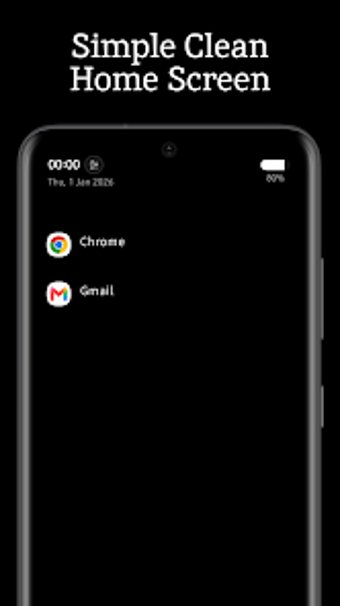
Void - Minimalist Launcher from Void Works replaces a conventional home screen to reduce digital distractions. It offers a text-first interface with a quick-access search bar and a customizable favorites list to launch apps with fewer visual triggers and more deliberate interactions. The app supports gesture navigation and light/dark display modes, and its lightweight architecture targets both high-end and budget devices. Intended users include digital detox seekers and productivity-focused individuals who want to cut home-screen clutter and mindless scrolling.
Void replaces icon grids with a text-first home screen
The app uses a text-based interface that removes colorful icons to limit visual triggers, while an integrated search bar lets users find and open any installed application quickly. A customizable favorites list stores frequently used items for one-step access. According to developer notes, some releases include limited icon support for users who prefer a hybrid layout, so adoption can be gradual rather than all-or-nothing.
It is engineered to run with low resource and battery impact
Void describes a lightweight architecture designed for high performance and low battery consumption, and the developer positions it as suitable for both high-end and budget devices. That design implies the launcher is intended to remain resident as the device's home screen without heavy draw on system resources, making it practical for day-to-day use on modest hardware where battery and memory matter.
Privacy-focused defaults reduce permission surface and data exposure
Void Works emphasizes user privacy, with the launcher intended to operate with minimal permissions and no intrusive data collection. This approach lowers exposure risk compared with launchers that require broad access. The app's strict minimalism also changes interaction patterns, so non-technical users can use the search bar and favorites to adapt, though those attached to visual cues may need time to adjust their workflow.
Well-suited for users seeking behavior change, but expect an adjustment period
Void is a suitable option for users aiming to reduce phone dependency through deliberate interface design. Its pared-down presentation encourages fewer impulsive openings, yet the reduced visual cues are a trade-off that can slow habitual workflows. Try the launcher for limited sessions to assess whether the resulting behavior change matches your goals before adopting it as your everyday home screen.
Pros
Text-based home screen reduces visual app triggers
Quick-access search finds and launches non-favorite apps
Privacy-minded design uses minimal permissions and no intrusive tracking
Lightweight architecture works well on high-end and budget devices
Cons
Strict minimalism can frustrate users who depend on icon recognition
Some advanced customization restricted to a pro-version tier
Laws concerning the use of this software vary from country to country. We do not encourage or condone the use of this program if it is in violation of these laws. Softonic may receive a referral fee if you click or buy any of the products featured here.